Blog Post
AI and TouchDesigner: Generative and Reactive Installations
From Passive to Reactive Immersive Experiences
Immersive experiences can use pre-produced content, reactive systems, or a combination of both. In a reactive installation, certain visual, sound, or physical elements change in response to data such as presence, position, movement, sound, or audience actions.
Not every contemporary experience needs personalization or artificial intelligence. The architecture should be selected according to the concept, context, budget, and type of interaction required.
A reactive installation can use sensors or input devices to collect information about presence, position, movement, sound, or specific actions. The software processes this data and changes selected visual, sound, or physical parameters.
Generative technology and artificial intelligence are implementation options, but they are not essential for building a reactive experience.
Reactivity allows content to change according to audience actions or presence. It can make the relationship between an input — such as movement — and the system response visible.
Interactivity does not guarantee engagement, memorability, or an emotional connection with a brand. These outcomes should be measured using indicators defined for each project.
These architectures can combine real-time software, sensors, communication protocols, and output systems. When required, they can also integrate computer vision or content-generation models.
People tracking and gesture analysis can be implemented through machine learning, but subsequent graphic changes can be made with rules, shaders, or procedural systems without using generative AI.
What Is a Reactive Generative Installation?
A reactive generative installation modifies or produces content from input data and rules defined by the system. Generation can be procedural — through algorithms, particles, shaders, or parameters — or it can use a generative AI model.
The result can vary between interactions, but it will not necessarily be unique: the same combination of inputs and rules may produce identical or similar results.
A reactive installation can include input devices, a processing layer, and output systems. Inputs can come from cameras, microphones, depth sensors, buttons, or other devices. The software transforms this data according to the designed logic and sends the result to screens, projectors, audio systems, lighting, or actuators.
The behavior should be documented through a clear input, processing, and output flow.
For a brand, a reactive installation can be used to show a visible relationship between a participant’s action and the experience’s content. Its suitability depends on the objective, space, audience, operations, and campaign metrics.
An installation does not guarantee stronger recall, positive perception, content creation, or organic reach. These outcomes require a distribution strategy and a measurement method independent of the interactive system.
TouchDesigner: Visual Development and Real-Time Processing
TouchDesigner is a visual development platform that can be used to build interactive systems, real-time audiovisual content, projections, and installations. Its operator-based architecture can process images, geometry, audio, data, and control signals within one project.
TouchDesigner organizes much of a project through operators connected in networks. This approach makes the data flow visible, but it does not eliminate the need for programming. Projects can require Python, GLSL, protocol configuration, optimization, and custom-component development.
Prototyping speed depends on the team’s experience and the complexity of the integrations.
TouchDesigner can process and render content in real time, and receive data from cameras, MIDI devices, sensors, and protocols such as OSC or Art-Net. Compatibility with each device or platform depends on its drivers, APIs, protocols, and available components.
Response is not instantaneous: total latency depends on capture, processing, communication, rendering, and the display system.
The interactive floor developed for Coca-Cola used TouchDesigner for the visual experience and MediaPipe to obtain tracking data through cameras. The system used position and movement information to modify procedural graphics in real time.
This case combines machine learning for body detection with procedural visual generation. It should not be presented as an example of generative AI, because the content was not produced by a generative model.
TouchDesigner can manage states, modify parameters from data, and execute logic through operators, Python, or GLSL. Shaders enable custom processing and rendering, but their performance depends on the implementation, hardware, and output resolution.
The platform can form part of an installation’s complete system, together with other services, applications, and devices.
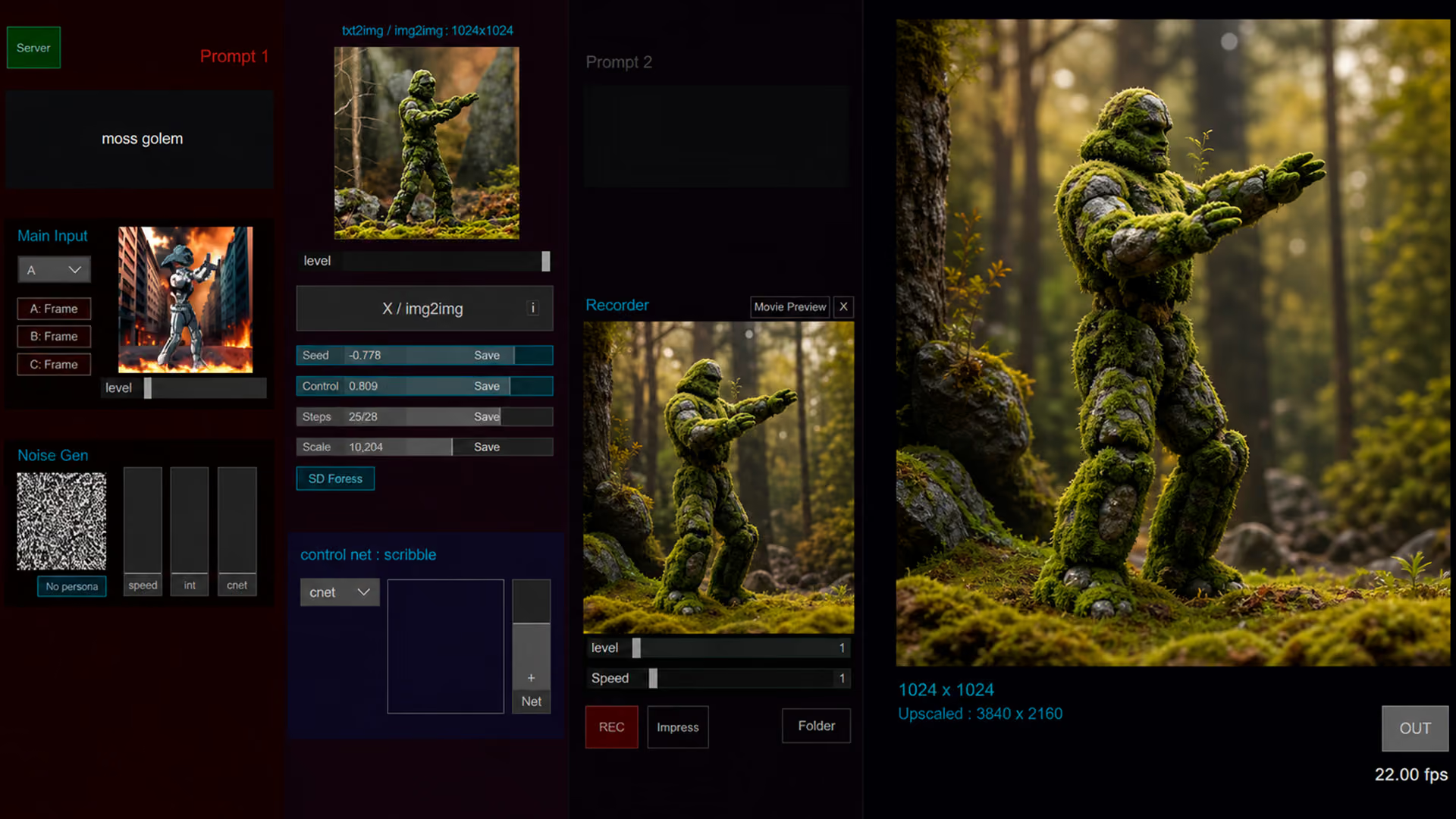
Integrating Artificial Intelligence: Beyond Traditional Programming
Artificial intelligence can be incorporated when a project needs a task such as classification, detection, content generation, or language processing. The model receives data and produces an output that TouchDesigner can then use to modify the experience.
Using AI does not mean that an installation understands its environment, learns during an activation, or adapts on its own. These capabilities exist only when they have been specifically designed and implemented. They can draw on different branches of AI:
Computer vision: it can be used to detect objects, people, faces, hands, poses, or landmarks in images and video. The output depends on the selected model and capture conditions. Detecting facial features or expressions does not mean understanding an environment or knowing a person’s emotions, intentions, or preferences. For example, in a Cinética Studio project for Coca-Cola, an interactive floor used computer vision, MediaPipe, and webcams to detect and track each user’s position. This allowed real-time procedural graphics to change visually according to movement and the number of people, creating a dynamic, reactive experience.
Natural language processing: it can be used to classify, interpret, or generate text. A voice interaction also requires audio capture and, usually, a speech-recognition system that converts the signal into text before processing it.
Generative models: they can produce images, text, audio, or other content conditioned by instructions and input data. Their use in real time depends on latency, hardware, connectivity, inference cost, and moderation mechanisms. The system should not be said to know a participant’s mood. Personalization should be based on explicit choices or clearly defined technical signals.
The relationship between TouchDesigner and AI is that the platform can integrate and visualize data processed by AI models. For example, it can receive movement coordinates, face detections, or posture analysis from a computer-vision system and use them as parameters to modify visual, sound, or lighting elements. TouchDesigner can also receive the output of a model or service as input to modify content. Communication is bidirectional only when TouchDesigner sends data or instructions back to the external system.
From Concept to Real-Time Interaction
Creating a reactive generative installation, especially one that integrates AI and TouchDesigner, may require design, art, software engineering, and data roles. The process consists of turning an idea into a system that receives inputs, processes them, and produces a defined response.
The first step is conceptualizing and designing the interaction. The team defines the type of experience, the data to be used as inputs — for example, movement, sound, biometric data, or environmental information — and how the installation will respond. Interaction flows and potential visual or sound decisions are also described. For an interactive floor that reacts to movement, for example, the team must define how graphics will change according to people’s position and movement.
Sensors and inputs are then selected and configured. This involves choosing technologies suited to capture the necessary data, from cameras and microphones to depth sensors or motion-tracking devices. An interactive floor can use cameras and computer-vision models such as MediaPipe to obtain position or movement data within the space.
The next phase is developing the generative system in TouchDesigner. Captured data is transformed into visual or sound elements. Operator networks — TOPs, CHOPs, SOPs, and DATs — can process sensor information. For example, tracking data can modulate procedural-graphics parameters so content responds to people’s paths. This phase can also include the experience logic and AI-model integration when the models perform a defined function.
Finally, the system is installed, calibrated, and validated on site. The detection area, occlusions, lighting, number of users, resolution, frame rate, end-to-end latency, and recovery mechanisms should be checked.
The goal is not to eliminate latency completely, but to keep it within an appropriate range for the interaction.
Cinética Studio Cases: Perception and Generation with TouchDesigner
The interactive floor developed for Coca-Cola illustrates a perception-based flow. MediaPipe obtained position and tracking data through cameras, while TouchDesigner used that information to modify procedural graphics in real time. The project used machine learning to detect people, but it did not use generative AI to produce the visual content.
In a photographic experience developed for a YouTube event for content creators, participants selected a music profile and posed in front of a camera. TouchDesigner managed the logic and presentation of the experience, while an SDXL-based flow generated an image related to the user’s selection.
The two cases show different AI functions: in Coca-Cola, a model supported body detection; in YouTube, a generative model directly contributed to producing the final image.
Challenges and Considerations When Implementing AI-Enabled Generative Installations
Generative installations that integrate AI and TouchDesigner can involve additional technical and operational decisions. Identifying these factors while defining the project helps establish a realistic scope, architecture, and validation criteria.
One challenge is performance. Real-time graphic generation and AI models can require meaningful computing resources, depending on complexity, resolution, number of inputs, and update frequency. Performance should be tested with the intended hardware, content, and operating conditions. Optimization can include reviewing operator networks, scripts, resolution, GPU load, and controlled-degradation mechanisms.
Sensor capture and calibration are another relevant consideration. Cameras, depth sensors, and microphones can be affected by lighting, occlusions, noise, distance, and the layout of the space. The Coca-Cola interactive floor used cameras and MediaPipe to obtain tracking data. The interactive mural for NESTLÉ NAN used LiDAR sensors to detect interaction on the surface. These cases show that the sensor type should be selected according to the required interaction. On-site validation should determine which conditions affect capture and how the system will respond when input is incomplete or unstable.
Scalability matters when an experience will be replicated or adapted to different spaces. A modular design and parameterized architecture can make it easier to adjust screens, sensors, resolutions, or the number of users, but they do not remove the need to validate each installation. If AI models are used, the model version, input data, inference resources, and process for updating configuration should also be defined.
AI integration also requires specific decisions: what task the model will perform, what data it will receive, how its output will be evaluated, and what will happen in case of errors, delays, or unusable results. Not every project requires training or fine-tuning; many can use existing models or services with defined configurations and limits. Communication with TouchDesigner should document protocols, data formats, timeouts, retries, and backup alternatives. AI can contribute a function to a system, but it does not itself guarantee creative, predictable, or appropriate outcomes.
Conclusion: Choosing the Right Architecture for Each Interaction
TouchDesigner can coordinate sensors, data, graphics, and output systems within a reactive installation. When a project needs detection, classification, or content generation, it can also integrate artificial intelligence models.
AI is not required to create generative graphics or build an interactive installation. Its use should answer a specific function, be validated through testing, and account for latency, hardware, privacy, moderation, and fallback mechanisms.
At Cinética Studio, this analysis forms part of the architectural definition for each experience: procedural generation, computer vision, and generative AI are distinguished to determine what function each component will perform.
Frequently Asked Questions
What is the difference between generative graphics and generative AI?
Generative graphics can be produced through rules, shaders, particles, or procedural algorithms. Generative AI uses trained models to produce synthetic content from instructions or input data.
How is TouchDesigner used in these installations?
TouchDesigner can receive sensor data, execute logic, process audiovisual content, and control output systems. It can also communicate with external AI models or services when a project requires it.
What role can artificial intelligence play?
It can be used for specific tasks such as body detection, classification, language processing, or image generation. Its function should be defined and validated for each experience.
Does AI guarantee a personalized experience?
No. Personalization requires defining which data will be used, how it will be turned into decisions, and what limits the system will have. Consent, privacy, and result review should also be considered.
Which Cinética Studio projects combine AI and TouchDesigner?
The Coca-Cola interactive floor used MediaPipe to detect people’s positions and TouchDesigner to modify procedural graphics. In a photographic experience for YouTube, TouchDesigner managed the interaction and an SDXL-based flow generated images related to participants’ choices.
Featured in
Our work has been recognized by leading industry publications covering creativity, technology, and innovation.
Discover interviews, features, and articles that highlight our projects and perspective.


You may also like
Ready to create something extraordinary?
From concept to execution, we design experiences that connect people, technology, and storytelling in unforgettable ways.